

Ask a systems integrator about “accounting” headaches start and you will hear about a deposit that landed in the wrong month, an invoice that had to be rebuilt because half the equipment shipped, a change order nobody billed, or a spreadsheet that exists only to tell the bookkeeper what the project manager already knows.
Those are not necessarily “accounting” problems, but instead are the results of disjointed processes driven by juggling multiple solutions for billing, payments and accounting. The longer a project runs, the more those reconciliation problems can occur. Integration work makes this worse than most trades. Projects are long, deposits are large, equipment arrives in waves, labor spreads across phases, and scope changes constantly.
Here are seven ways the picture changes when billing, payments and accounting live next to the project itself instead of downstream of it.
7 Ways Built-In Accounting Changes the Way You Operate
1. Billing Can Follow the Job Instead of the Quote
A proposal describes what you plan to do. An invoice should describe what you did. On a long project those two documents can drift apart… some equipment is delivered, some is backordered, labor is half complete, and a change order sits somewhere in the middle.
When invoicing sits next to the bill of materials and item status, you can bill for exactly what was delivered, including partial quantities and partial hours, and see at a glance what has been billed and what is left. The same principle extends to the paperwork customers' accounts payable teams ask for. A PO number that travels with the invoice, and can even be captured when the client signs, removes one of the most common reasons an invoice sits unpaid.
2. Understanding Deferred Revenue vs. Revenue Recognition
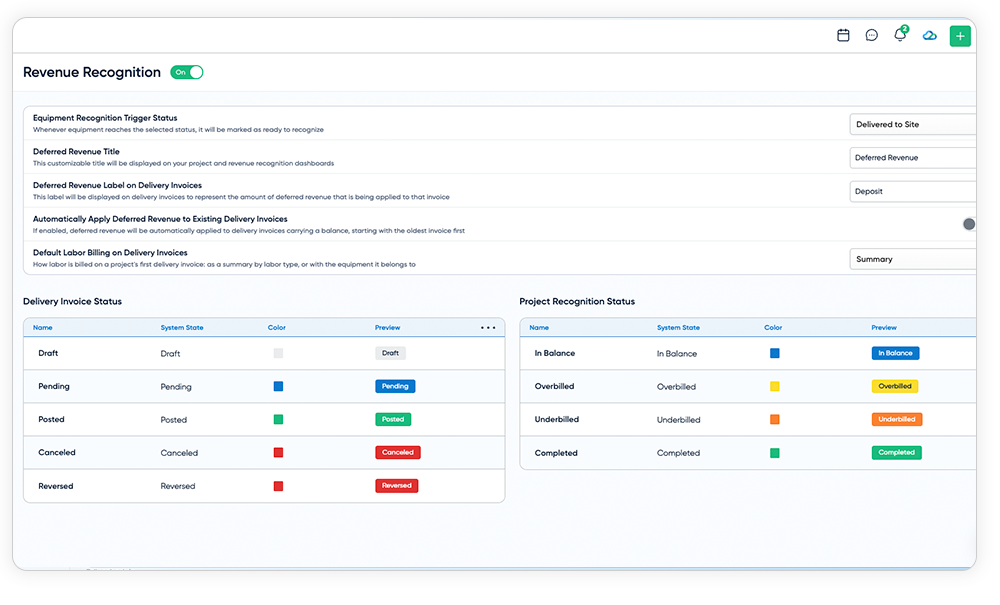
Integrators routinely collect substantial deposits before a single piece of equipment is on the wall. Cash in the bank feels like income, and in many systems it gets recorded as income the day it arrives. But the work has not been done yet. Until it has, that money is better understood as a liability… something owed to the customer in the form of delivered equipment and finished labor.
That distinction is what deferred revenue and revenue recognition are about. Holding deposits as a liability and recognizing revenue as items are delivered or installed puts income in the period it was earned, keeps margins from looking inflated early and starved later, and gives owners, lenders and accountants a truer read on the health of the business. The specifics of how and when to recognize revenue are decisions for your accountant, and they will differ from one company to the next. What matters is that your software tools let you follow whichever approach your accountant chooses without a side spreadsheet.
3. Payment Schedules Move when the Scope Moves
Most integrators have experienced a situation in which a payment schedule is set up at the start of a project, then the scope changes multiple times, and then the milestones no longer coincide to the contract. Someone has to recalculate by hand, and the errors tend to show up when the customer questions a bill.
Milestones tied to percentages of products, labor, phases, systems or locations, rather than fixed numbers, adjust automatically as the quote changes. Saved as templates, they also make terms consistent from job to job. For repeat clients who negotiated their own terms, a default schedule at the account level means the agreed structure shows up on every new quote instead of living in someone's memory.
4. The Accounting Ledger Should Match the Project Record
Most integrators will keep using QuickBooks or Xero, and they should. The question is how much manual effort sits between the project record and the ledger. Every manual step is a chance for a mismatch, and every mismatch is time spent in month-end hunting for it.
Small details do a surprising amount of work here. Invoice numbers, project names and invoice types that appear automatically on the accounting side make reconciliation faster. Being able to filter for projects, invoices or purchase orders that have not been mapped to the accounting system means nothing quietly falls through the cracks. And when deposits applied against a delivery invoice show up in the books the way your accountant expects, the finance conversation shifts from "why don't these match?" to "what do these numbers tell us?"
5. Getting Paid Is Part of Accounting, Not a Separate Step
It is easy to treat payment collection as an afterthought: something that happens after the invoice, on a separate system, with its own reports. But the moment money arrives is the moment the books need to know about it, and every gap between those two events is reconciliation work.
When payments run through the same system as the project, deposit defaults can be set so nobody forgets one or collects one by accident, and convenience fees can be shown clearly in the invoice totals. Payment, deposit and chargeback reports use the same filters and time zones as everything else, and large exports run in the background while you work. Faster funding options, such as next-business-day ACH, shorten the time between work done and cash in hand. None of this is exciting, which is exactly the point. Good financial plumbing disappears into the background.
6. You Can See the Whole Portfolio, Not Just One Project
A single project's numbers are useful. The view across every active project is what lets an owner steer:
- How much deferred revenue are we carrying?
- What did we recognize this quarter?
- Which projects are underbilled relative to the work completed?
- Which jobs are ready to invoice right now?
Those questions are hard to answer when the data lives in separate documents, and they are the ones that tell you where cash is hiding. Pairing a company-wide revenue view with job costing detail, actual versus budget and variance for product cost, labor cost and labor hours, turns accounting from a record of the past into an early warning system for the projects that need attention.
7. Good Controls Are What Let You Hand the Work Off
Many integrator owners are still the person who understands how invoicing really works, which can make them the bottleneck. They hesitate to delegate because giving someone access to invoices can feel like giving them access to everything.
Granular permissions change that. When creating and managing invoices is a separate permission from deleting them, and a ready-made accounting group gets new staff set up quickly, delegation becomes realistic. Archiving instead of deleting, with the full invoice preserved, read-only and its number never reused, gives you a clean audit trail. Bulk status updates and filters by salesperson cut the repetitive clicking. The payoff is not just security. It is an owner who can step back from the back office without losing sight of it.
Frequently Asked Questions
Q: What is deferred revenue, and why does it matter to an integrator?
A: Deferred revenue is money you have collected for work you have not yet delivered. For integrators who take large deposits up front, recording that money as a liability until the work is delivered or installed keeps revenue in the right period and gives a more accurate picture of profitability.
Q: Do I need to replace QuickBooks or Xero to benefit from this?
A: No. The goal is to reduce the manual work between the project and your accounting system, not to replace the system your accountant relies on. Keeping the two closely matched is what makes month-end faster.
Q: Does this mean I no longer need an accountant?
A: No. Software can make it easier to follow whatever approach your accountant recommends, but decisions about how and when to recognize revenue, and whether your practices meet any accounting standard, belong to a qualified accounting professional.
Q: What if my accountant doesn't want me to recognize revenue this way?
A: Then you should not. The point is flexibility. Features like these should be something you can turn on when they fit your business and off again without losing your invoices or history.
The Bottom Line
The most valuable thing about connecting billing, payments and accounting is not any individual capability. It is what happens when the project, the invoice, the payment and the ledger stop being four separate versions of the truth and become one. Integrators spend less time translating between systems and more time acting on what the numbers say: who owes what, what has been earned, which jobs are underbilled, and where the cash is going. That clarity, more than any single feature, is what lets an integration business grow without the back office growing faster than the business.
This article is for general informational purposes and is not accounting, tax or legal advice. Consult your accountant about the right practices for your business.
The latest features in D-Tools Cloud bring together billing, payments and accounting in a single, easy-to-use solution. Start a free D-Tools Cloud trial or request a demo to build a proposal and a change order in your own account.
