
With the release of SI v24, D-Tools has delivered what we believe is a genuine game-changer. Combined with recent enhancements, SI is now firmly established as the go-to enterprise-level software platform in the market. Our development team remains committed to continuous innovation — evolving SI to meet the needs of this market sector and our existing user base. Rest assured: SI isn't going anywhere. With that, let's dive in!
For those of you who are ready to “get with the program” and upgrade your prior version of SI, please reach out to our Customer Success team. Moreover, for those of you who are still considering the acquisition of D-Tools SI software, please reach out to our Account Management team.
Multi-user Mode
It's finally here! SI now allows multiple users to work on the same project simultaneously. As with any major workflow change, there are important considerations to keep in mind — so for the best experience, we recommend reaching out to our PSG team for guidance. Now onto the feature!
Access the Control Panel and then your SI Project Rules. The setting is located on the Multi-User Editing tab: 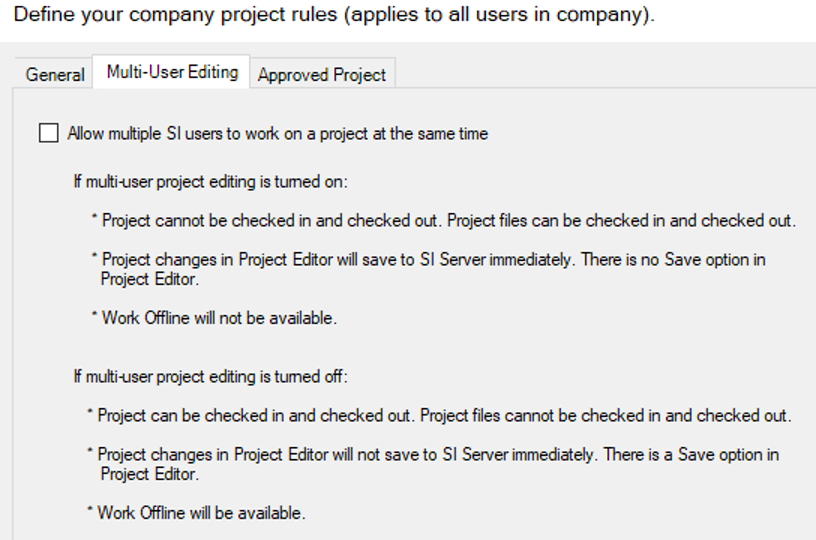
Enabling the checkbox here will then set your team on the path to multi-user collaboration on all SI Projects.
A couple of key considerations before starting:
- All SI Projects must be checked into your SI Server.
- All active SI sessions will be disconnected once this selection is saved on this tab. Users will then simply reconnect in order to enter Multi-user mode.
From here, there will be no more checking in and checking out of Projects. For long-term users of SI, this may take some adjustment. To simplify the process, just save and close the Project — the file will automatically be stored on the server.
The real breakthrough here, of course is the ability for multiple SI users to actively engage in collaboration efforts on a single SI Project. This will surely ease the burden of large-scale design-build bids or those with incredibly tight deadlines.
Similar to how a checked-out Project displays its assigned user, a new Sessions icon in the lower-left corner of the Project editor shows who is actively working on the Project.

This will then reflect any active users now engaged on the project.
A quick note on Visio and AutoCAD integration: this aspect of the Project structure is unchanged. Users working in either design environment will still check out a single Project drawing file as usual. The development team continues to explore multi-user options for design environments, but for now, single-user access remains in place.
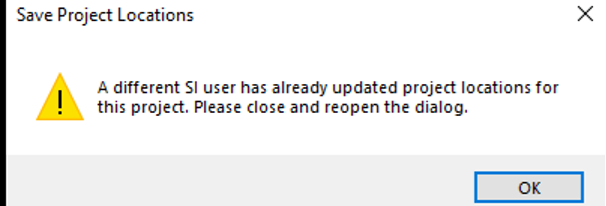
With that said, the benefit still applies to multiple users working on an SI Project at the same time. A simple designation as the first version of the Project that is saved and closed will be the active file in the Project Explorer. Any efforts to save after this will trigger a pop-up box that instructs users to reopen the dialog.
 All in all, this feature increases project bid turnaround time, fosters collaboration, and helps reduce errors. This new aspect of SI Project building is a real breakthrough and again, clear evidence of SI’s place as the go-to enterprise solution for AV integrators.
Arrange Items in an SI Project
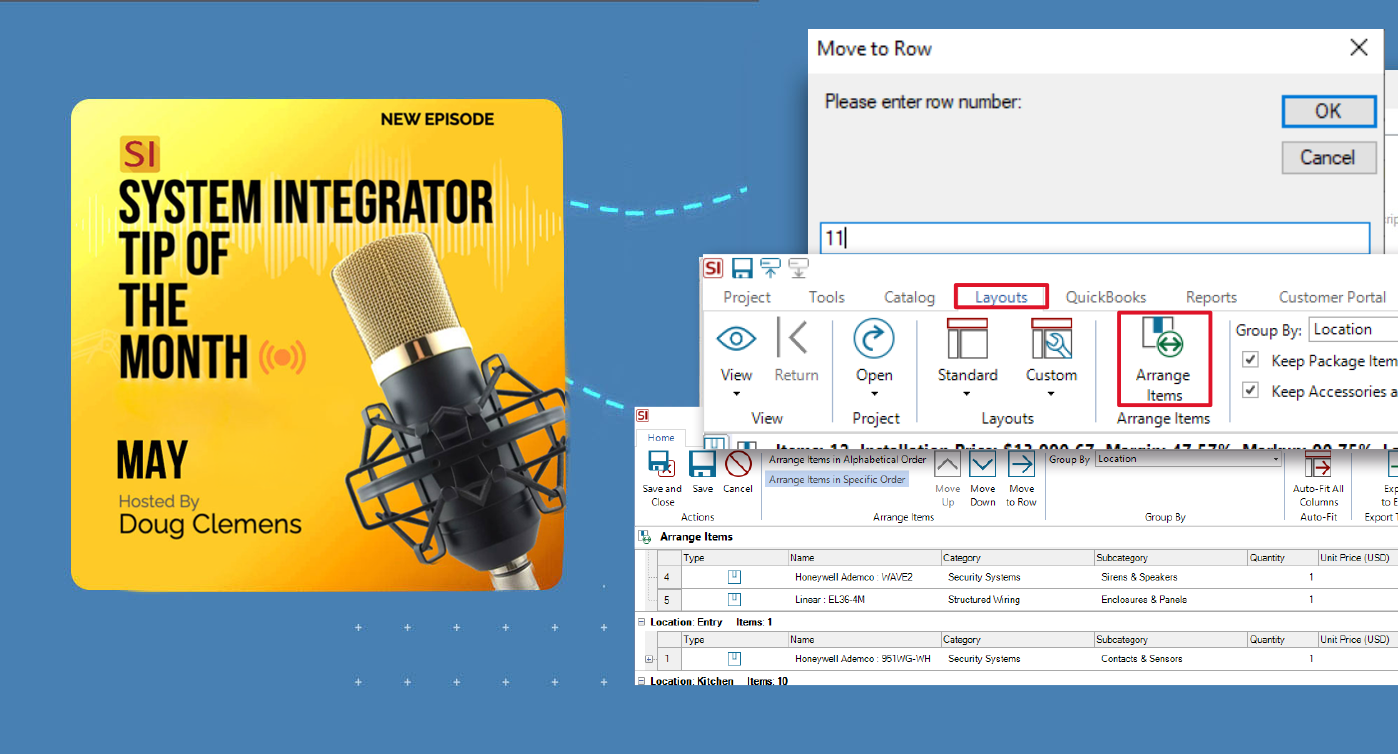
Speaking of a long-awaited and much sought-after feature, SI now has an Arrange Items feature available in the Project Explorer.
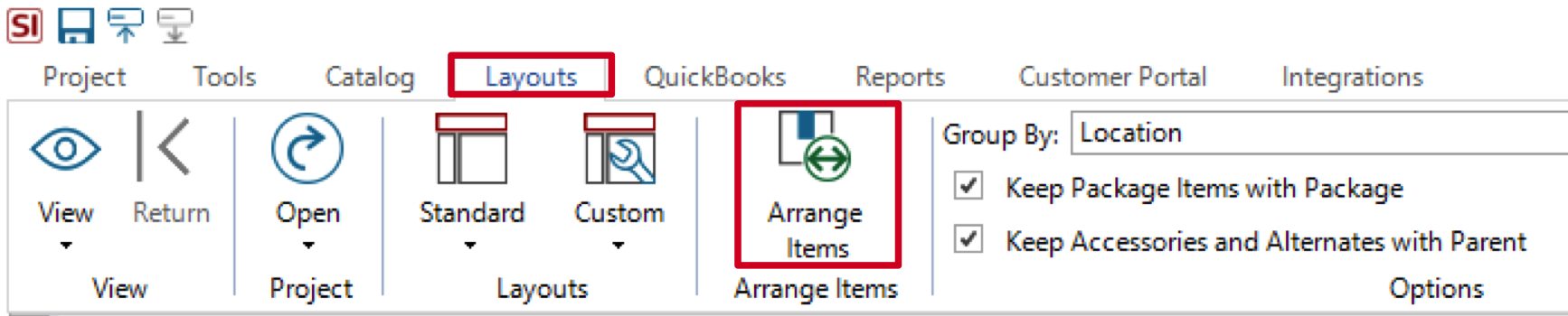
This is something that users have been requesting for many years, and now it is here.
Finally, offering the flexibility in terms of the bill of materials presentation in the SI Project, users can now simply choose their desired order of items once they are present in the Project list.
Once selected, users will now see a screen that repopulates their BOM into a new screen where they can choose the presentation of items in the Project viewer:
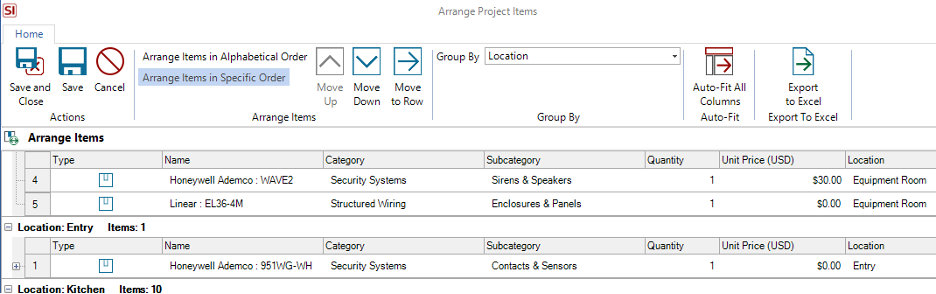
Alongside the standard Move Up and Move Down buttons, a new Move To Row option has been added.

This allows users to assign a row number directly to any selected item, significantly speeding up the arrangement of large BOMs.
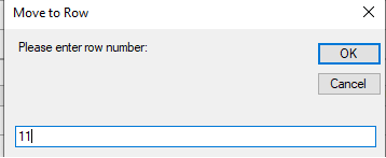 A very nice addition to this feature!
Once the preferred arrangement is achieved, simply click Save and Close to see the results in your Project Editor view. Now our users can achieve what they’ve always wanted with their SI products list. A clear, concise presentation of all items in their preferred order of appearance.
Another benefit here if your team clones prior Projects for new bids. You’ve probably guessed where I’m going with this already, but yes, the Arrange Items designations will transfer from the source Project to your new one! A definite time saver.
And, for those who are used to the prior offering of Arrange Items in your SI Reports, this feature is still here, but now linked to the Arrange Items for your Project view. Just another convenience for our users.
Improved Layouts
While not as major as some of the feature enhancements usually profiled here, improvements to the Layouts in SI happens with almost every product release.
For example, at some point in the not-too-distant past, we slipped in a Change Order Layout in the SI Project Editor:
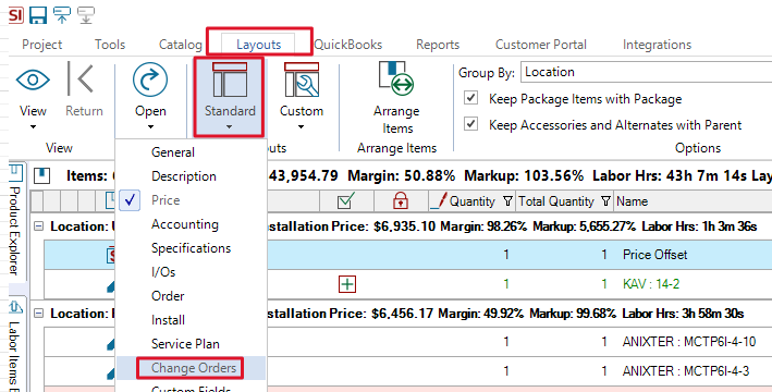
Here users can see all relevant information related to Change Order data directly in the SI Project:
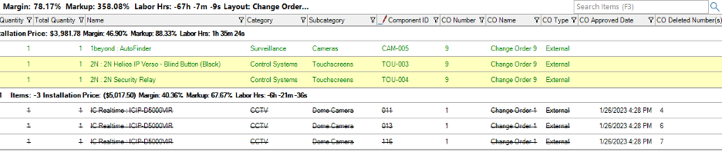
Some of the data fields displayed here are as follows: CO number, CO name, CO Type, & CO Approved Date.
Many users have asked for just such a display, and I wanted to point out that it is available since I myself just became aware of it recently.
Just goes to show, you should always review our new Product Release Notes for each version!
Well there it is! A brief look into a few newer aspects of D-Tools SI v24. Keep in mind, there is much more than just these features for your team’s consideration, so please reach out to our account team for more information on all of the above and more!
Looking Ahead: SI v24 and beyond
The last few years have seen tremendous updates and enhancements to the System Integrator platform. With each successive development and addition, D-Tools has shown itself to be fully engaged in bringing to market one of the most effective software platforms available.
Further, the updates coming in future releases reflect our commitment to addressing the real-world challenges faced by system integrators. In addition, what’s to come will not disappoint.
Are you ready to more fully experience d-Tools System Integrator software? Then visit the D-Tools’ website to request a demonstration of these features or explore the full range of utilization with our PSG training and implementation team. With SI, as your ally, your business will be poised for a brighter and more profitable future.
Be sure to tune back in here for future installments on SI’s v24 and beyond.
In closing…
For assistance from our Professional Services Group of SI and integration industry veterans.
For more information on other features of SI, please see this press release about D-Tools v24. You can also review other videos from our YouTube channel and our usual online support documentation.
You can also get more detailed information about v24 by signing up for our upcoming Gold Support Webinars and by enrolling in SI training with our PSG team.
And don’t forget, that’s why we are here…to ensure your success with our product! Be sure to check back here next time for more on System Integrator software!!!